 eskiu
eskiuNative apps, written in Eskiu
Write the interface once as Eskiu functions. It draws UIKit views on iOS,
android.view views on Android and the DOM on the web, and runs in a webview
on macOS, Linux and Windows, from the same code.
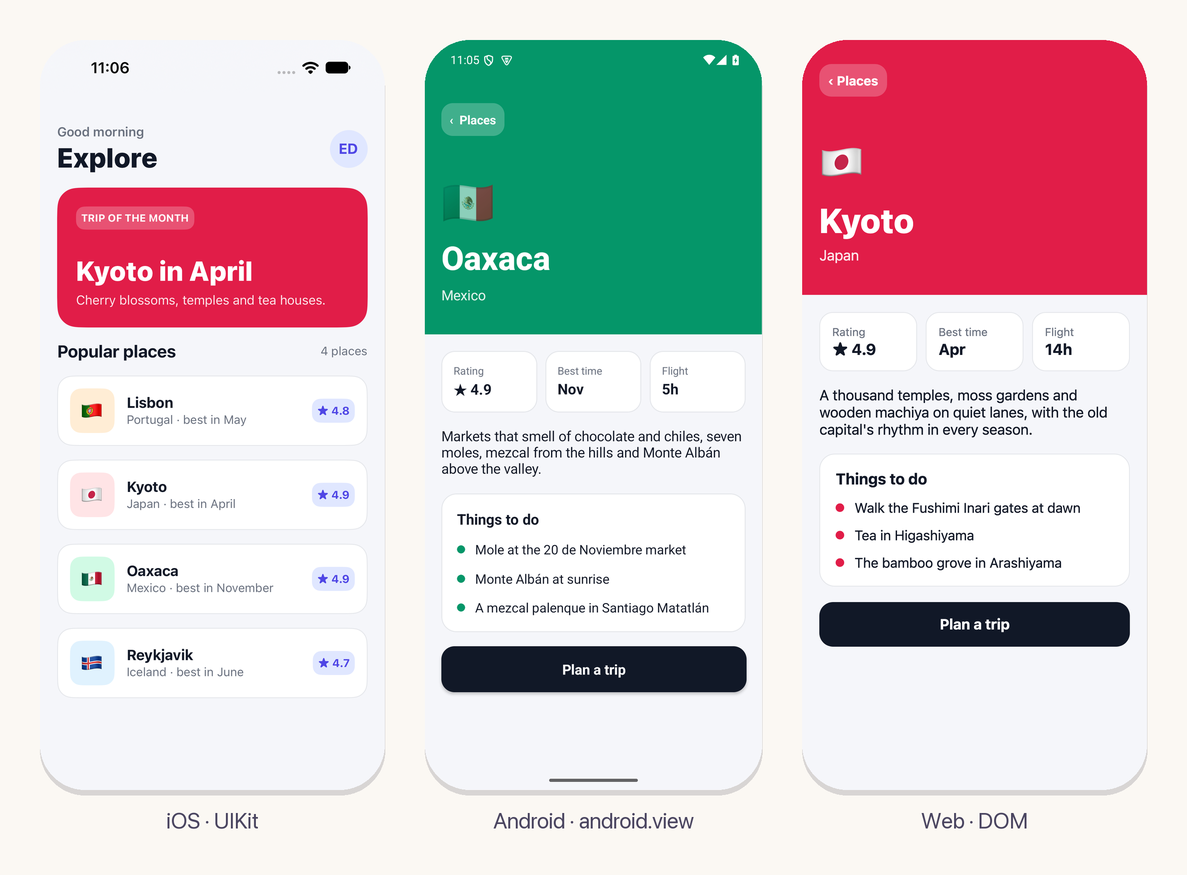
Create native apps for Android, iOS and the web
A component is an ordinary Eskiu function. It calls Column,
Text and Button to build the view, and keeps its state in
signals. The app compiles to machine code on iOS and Android and to WebAssembly on
the web.
Text, buttons, fields, switches, lists, modals and alerts are the platform's own controls, with the platform's accessibility.
import <string>;
import <ui>;

void Counter() {
    Column(Style{padding: 24, gap: 12}) {
        *Signal<int> count = use_signal<int>(0);
        String label;
        defer String_free(&label);
        String_format(&label, "Pressed %d times", count.get());
        TextWith(Style{font_size: 28, font_weight: 700}, label.data);
        Button("Press me") {
            count.set(count.get() + 1);
        }
    }
}
Written in Eskiu, drawn by the platform
Components, state and layout rules are the same Eskiu code everywhere. Each frame, the core sends the platform one buffer with the changes, and a thin host applies it to real views laid out by Yoga, the engine React Native uses.
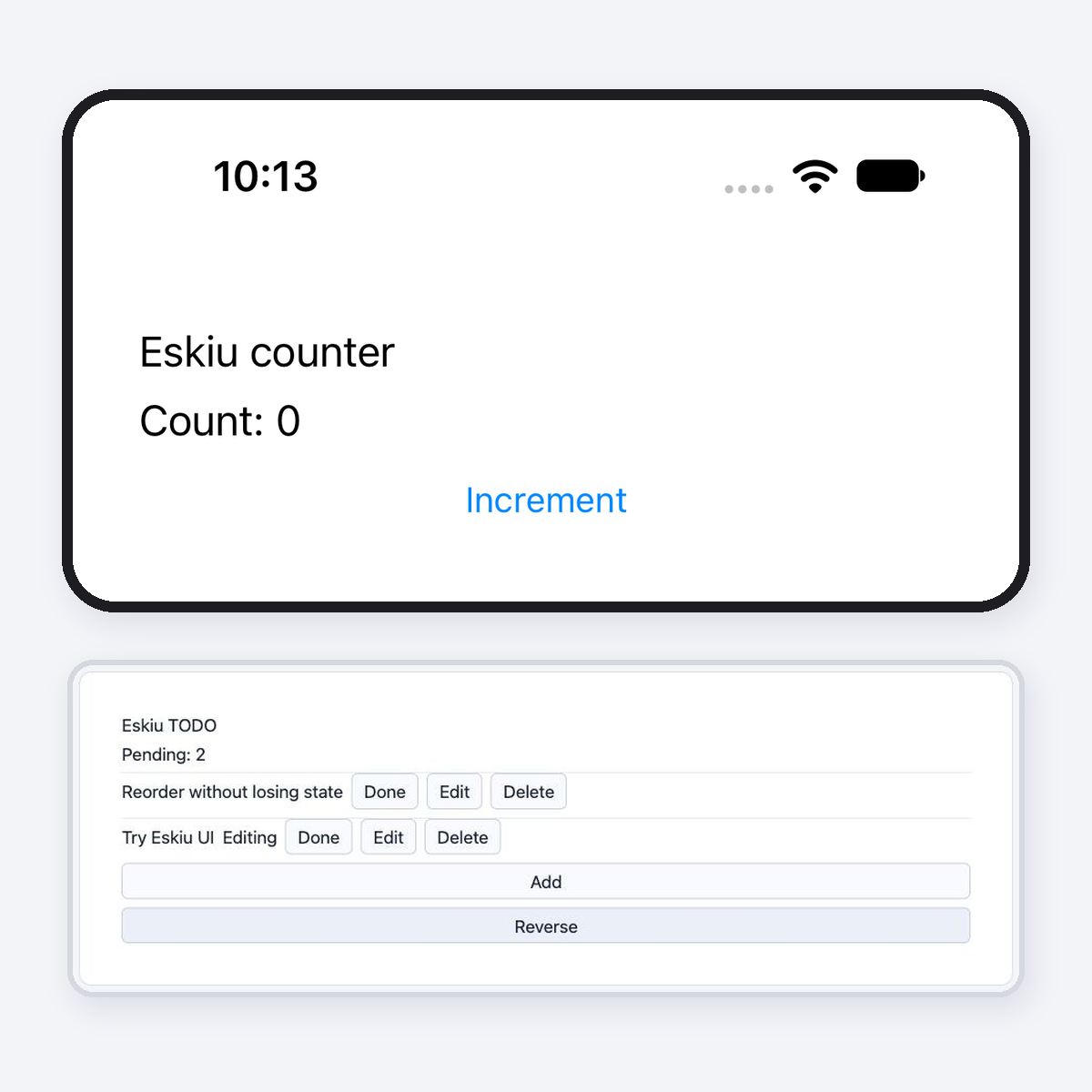
Updates that touch only what changed
A block records the signals it reads. When one changes, only that block runs again and its children are matched by key, so a list keeps each row's state when it is reordered. Virtual lists mount only the rows near the viewport, so a million rows cost what a screenful does.
Hooks, keys and memos are checked as the app runs, and a mistake stops with where
it happened: in Column[0] > TodoRow[key 3].
An exception does not close the app. A render that throws shows the nearest
ErrorBoundary’s fallback, and nothing of that render reaches the
screen. A handler or an effect that throws is reported, and the app goes on.
See each change in a third of a second
ui serve watches the app and the packages it depends on, and builds
again when a file changes. On the web the page reloads, keeping its URL and its
saved data. On the simulator and on Android the running app starts again on the new
code in the same process, so nothing is installed or launched again.
A build that fails shows the compiler's errors over the app until the next one works.
$ ui serve ios
ui: built in 2.4 s
Watching for changes
ui: changed, building
Restarted the app on the new build
ui: built in 0.3 s

# measured with the kit gallery on an Apple-silicon Mac
Overlays, pickers and toasts
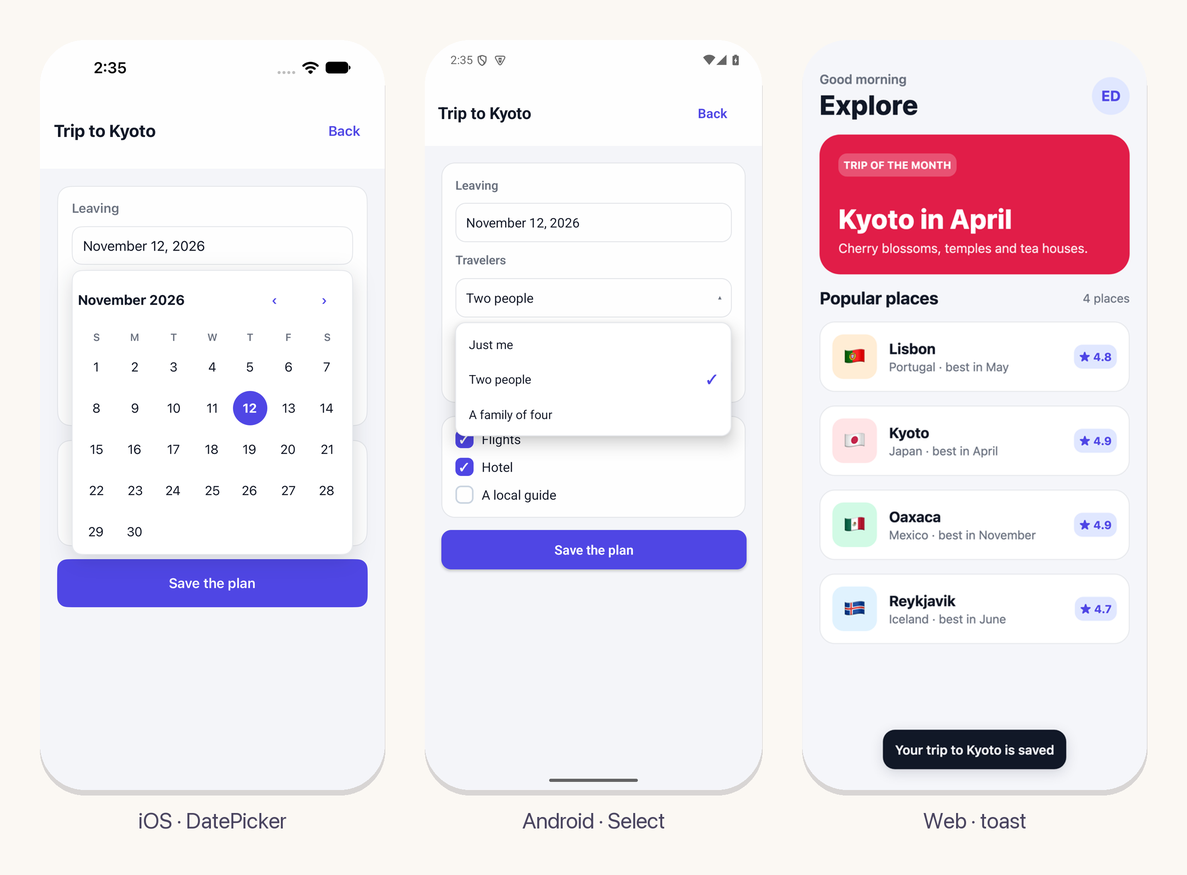
<ui/kit> is a set of themed components built from the same
elements: cards, buttons, fields, checkboxes, tabs and bars, and the things that open
over the content. A Popover places itself next to what opened it, above
or below, inside the window. DatePicker, Select,
DropdownMenu, ColorPicker and Tooltip are built
on it, and kit_toast shows a message for a few seconds.
The theme follows the system's light or dark appearance, or one you set.
Motion and gestures
A style can move, scale and turn an element and fade it, and
transition_ms animates each change on the platform: UIKit animations,
Android's view animator and CSS transitions. A spring is one of the curves.
ui_on_pan reports a drag with its distance and speed, and takes over
from a button inside once the finger moves. use_animated moves a number
to its new value, for what the platform cannot animate. The kit's
SwipeToDelete is built from the two.
Animations run on the display's own clock (CADisplayLink,
Choreographer, requestAnimationFrame): they can repeat, go
back and forth, chain keyframes and say when they end. use_frame hands
the same clock to a game loop, and the canvas
package draws sprites on it.
*Signal<int> dx = use_signal<int>(0);
*Signal<bool> held = use_signal<bool>(false);
ui_on_pan(void(Pan p) {
    held.set(p.phase == PanBegan || p.phase == PanMoved);
    dx.set(held.get() ? p.dx : 0);
});
Row(Style{translate_x: dx.get(),
          transition_ms: held.get() ? 0 : 250,
          easing: EaseSpring}) {
    Text("Drag me");
}
The phone's services, from one API
What an app asks of the system has one name on every platform, and each host answers with the platform's own service.
ui_color_scheme() and the kit's themes follow the system as it changes.ui_fetch through NSURLSession, HttpURLConnection and the browser's fetch.use_interval and use_timeout, kept by the platform's clock.use_app_state is told when the app goes to the background and comes back.ui.toml, held while fonts and saved state load.[env] values that differ between development and the stores.Native code when you need it
An app or a package ships code per platform in native/: Objective-C or
Swift on iOS, Java, Kotlin or C on Android, JavaScript on the web. Eskiu calls it
through extern functions, it answers with events, and it can register
its own views for NativeView.
Third-party libraries come from ui.toml: Maven dependencies build through
Gradle and Swift packages through Xcode, and a package brings its own to every app
that uses it. Packages made this way add the
location, camera,
barcode scanning, step
counting, secure storage and
SVG drawings.
# ui.toml
[app]
name = "Explore"
scheme = "places"

[ios.spm]
Collections = { url = "https://github.com/apple/swift-collections", from = "1.1.0" }

[android]
dependencies = ["com.google.android.material:material:1.12.0"]
permissions = ["android.permission.CAMERA"]
From your editor to the stores
ui open ios and ui open android make the app's Xcode and
Android Studio projects and open them there. Each Run builds the Eskiu code first, so
an edit to a .esk file is in the next Run, with the native debugger, the
profilers and your own phone.
ui release builds for the App Store and Google Play: an IPA signed for
your team, and an App Bundle signed with an upload key it makes and keeps for you.
It checks the icon and the app's id before building, takes the build number from the
clock, and with --upload sends the iOS build to TestFlight. For the
desktop and the web it makes a signed .app, a Linux binary and a Windows
.exe, each with an archive to distribute, and a zip of the web build to
deploy.
# ui.toml
[app]
name = "Explore"
id = "com.yourcompany.explore"
icon = "icon.png"
version = "1.0.0"

# Xcode, with each Run building the Eskiu code
$ ui open ios

# the App Store and Google Play
$ ui release
ios: build/ui/ios/release/Explore.ipa
android: build/ui/android/release/Explore.aab
From nothing to a running app
The ui tool makes a project and builds or runs it on each platform. It
needs emscripten for the web, Xcode for iOS and the Android SDK for Android, and on
the desktop a C compiler with WebKitGTK on Linux or MinGW-w64 or MSVC on Windows.
Every element, hook and service is listed in Components and APIs.
To start from a whole app, ui-starter has tabs, screens with links, a list from the network and a saved theme. For a package with native code, start from ui-package-template.
git clone https://github.com/eskiu-lang/ui
eskiuc ui/tools/ui/main.esk -o ~/.eskiu/bin/ui

ui new myapp && cd myapp
ui serve          # or ui serve ios, android, macos
ui is in preview. Views are written with trailing blocks: Column(Style{padding: 16}) { ... }
passes the block as the call's last argument. It needs Eskiu 0.14 or newer.